 By
By In today’s AI age, photo editing and graphic design are easier than ever. Where you once needed a professional photographer and editor, now anyone can create high-quality, ultra-realistic, cinematic images with the right AI tool and the right prompt.
One popular trend is making images where a model poses with 3D text that looks like a real object.
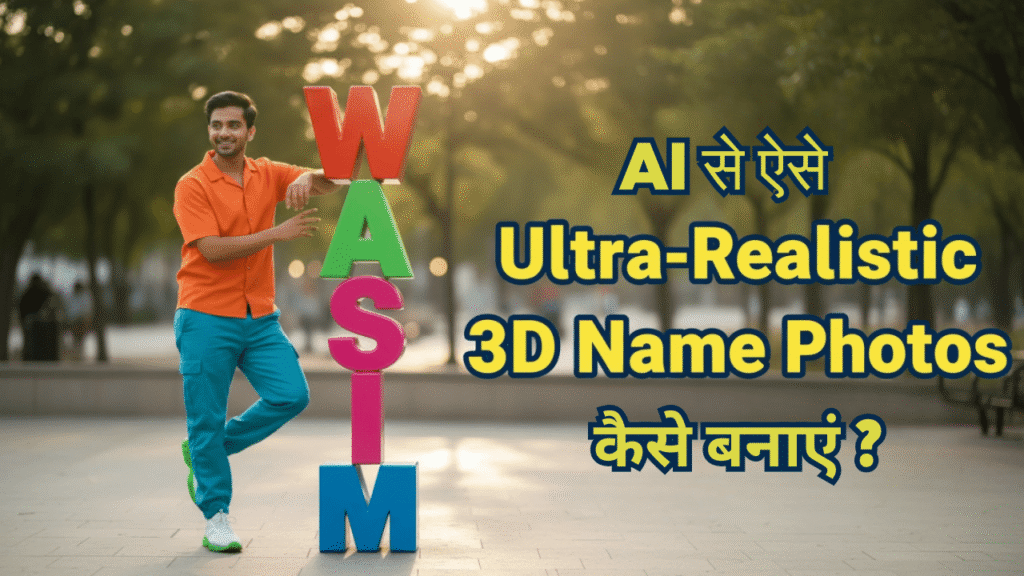
In this article we learn how to generate a photo with ultra-realistic digital art + vertical 3D text using an AI model like Google Gemini. This guide is for everyone who wants such pictures for social media, blogs, branding, posters or creative design.
📌 Why are AI photos with 3D text popular?
AI-generated images are used everywhere today:
- Social media posts
- Banner designs
- YouTube creatives
- Professional presentations
- Digital portfolios
Images with 3D text are special because:
- they look eye-catching
- they give the photo a unique look
- the interaction between the model and the text makes the photo look more professional
- a name, title or brand can be shown beautifully
- they are made with AI alone, without Photoshop
That is why this trend grew so fast in 2024–2025.
📌 What do you need to make such an ultra-realistic photo?
You need only two things:
- an AI image generator (such as Gemini)
- a correct, precise prompt
Without the right prompt, many people get spelling errors, wrong 3D text, extra letters or unrealistic faces.
The prompt below solves all these problems.
📌 Perfect AI Prompt (Use Any Name)
Here is the prompt that gives great results on most AI image models.
Just replace “YOUR NAME” with the text you want.
👉 Ultra-Realistic 3D Text Photo Prompt (General Use)
Ultra-realistic digital art of a full-body person in a dynamic pose, wearing stylish modern casual clothing in bold contrasting colors — vivid shirt, relaxed pants, trendy shoes, soft directional lighting, hyper-detailed textures, natural shadows, high-resolution cinematic look.
A single vertical 3D text object appears in the scene, rendered as large glossy block letters in bright bold colors.
The text must display "YOUR NAME" with exact spelling, no extra or missing letters.
The model interacts with the 3D text by leaning on it, touching it, or resting a hand over it.
The text must appear only once, large, sharp, realistic, and physically accurate.
Maintain the same face across all outputs.
Ultra-sharp 8K quality, photoreal lighting, realistic proportions, and crisp edges.
📌 Step by step: how to make this photo in Gemini?
1. Open Gemini and go to image generation
Open Gemini or any AI art generator where you can enter a prompt.
2. Paste the prompt above
Remember to write your text in quotes (” “).
This stops the AI from misspelling it.
3. Choose an output style (if available)
Some AI models offer styles such as Realistic, Artistic or Photographic. Choose “Photorealistic”.
4. Generate the image and check the variations
The AI gives you 2–4 images.
Pick the best one, or press “Regenerate” for a new result.
5. Fine-tune the prompt if needed
If you don’t like the face consistency or lighting, add specific instructions to the prompt.
Each time, the AI follows your instructions better.
📌 Where can you use these photos?
AI photos with 3D text are useful for many things:
✔ Branding
Perfect for showing your name or brand name.
✔ Social Media Posts
High-quality creative posts on Instagram, Facebook and LinkedIn go viral easily.
✔ YouTube Creatives
Useful for intros, thumbnails and channel branding.
✔ Website Graphics
Use them as hero images on a blog or home page.
✔ Personal Portfolio
Very useful for giving a photo a designer look.
📌 What to keep in mind when making photos with AI?
- Always write the text in quotes
- Use only one text object at a time
- Mention bright lighting and natural shadows
- Keep the colours clear
- Don’t make the name too long
- Describe the pose and how the model interacts with the text in the prompt
With these instructions the result is always better.
📌 Conclusion
AI gives everyone the power of a graphic designer today.
With just one good prompt you can make ultra-realistic, cinematic, professional-quality photos with 3D text in seconds.
Follow the prompt and steps in this guide to take your creativity to a new level.
Whether for social media, branding or your website, AI-generated images look great everywhere.
On Formoni.com we will keep bringing you more useful tutorials and guides like this.