By
By Today our personal information, SMS, call details and contacts are stored on our phones. If the phone is lost or has to be reset, this data can be lost too. E2PDF is a useful app that lets you back up your contacts, call details, SMS and other important data as XML or PDF. You can keep these backups safe in email, Google Drive, Dropbox or any cloud storage, and restore your data whenever you need.
Note: This method is only for backing up the call details and SMS of your own phone. No app can pull the call details of someone else’s number, and doing so without permission is a crime.
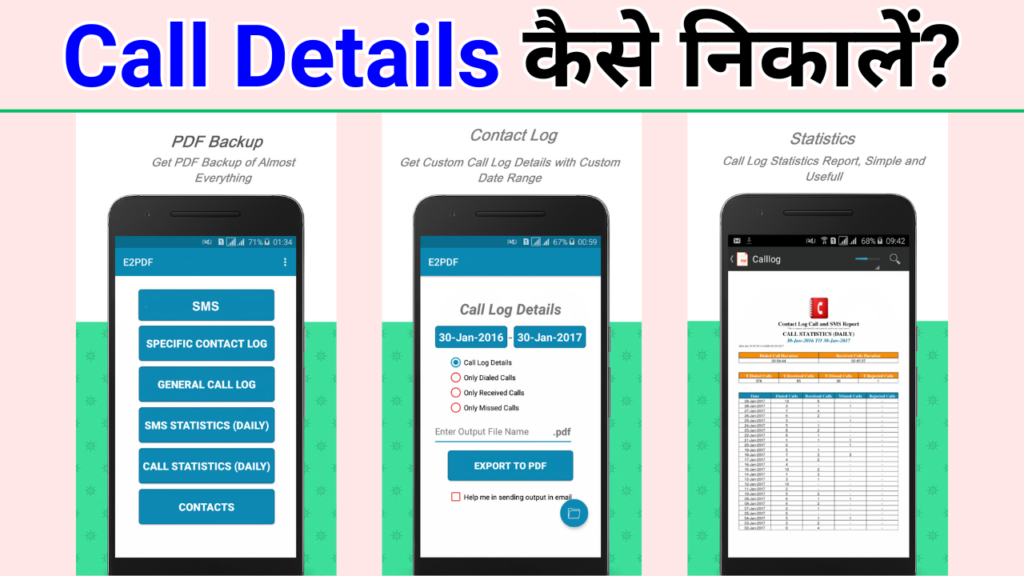
Features of the E2PDF app
- SMS backup and restore / back up favourite SMS as PDF
E2PDF is a simple, effective app for backing up your important messages. You can save an SMS conversation with someone special as a PDF and keep it in the cloud or email. You can back up conversations with friends, family and business partners. Just choose the conversation, enter a file name and create the backup in one tap. - Call details backup and restore (dialled, received, missed)
E2PDF also backs up your call details. The backup is created in a readable XML format, and the PDF backup feature makes it easy to save your calls. The backup includes dialled, received and missed calls with full call details, and you can restore your old call log on any device. - Specific contact log (SMS and call log)
This feature backs up the SMS and call details of one specific contact as a PDF. It also includes a free Truecaller specific-contact backup. You can save the whole conversation with a loved one, a friend or another important person as a PDF. - Call statistics
Call statistics show your call data in detail: the number of dialled, received, missed and rejected calls per day, and the total call time for any date range. - SMS statistics
SMS statistics show how many messages you sent and received, per day and for any date range. - Contacts backup (optional: contact name, number, email address)
You can also back up your contacts and choose which details to include: name, number and email address. You can even export your Google Contacts to PDF: open Contacts, go to Settings, choose your Gmail account, then pick the Contacts menu in E2PDF and follow the usual steps. Your Google contacts are exported to PDF and you can save them in the cloud.
Extra features and sharing options
PDF generation and compatibility: PDFs made with E2PDF open in all major PDF readers, such as Adobe Acrobat, Nitro, Xodo PDF Reader and Foxit. You can share them by email, WhatsApp, Wi-Fi Direct or Bluetooth, or save them directly to Google Drive, Dropbox or iCloud.
Disclaimer: E2PDF does not send your contacts to any server, so your privacy is protected.
Why choose E2PDF?
E2PDF is a safe, easy-to-use app that helps you back up and restore your important data. It saves SMS, call details, contacts and other data as PDF, which is very handy. A PDF backup can also be useful as a record for official or legal purposes.
How to use E2PDF?
- Download the app: Get E2PDF from the Google Play Store or the App Store.
- Open the app and adjust the settings.
- Choose a backup option: Pick the option to back up SMS, call details or contacts.
- Create and save the PDF: Create a PDF of your data and save it to the cloud, email or any other location.

Conclusion
E2PDF is a simple, safe app that backs up your SMS, call details and contacts in PDF format. It not only keeps your data safe but also makes it easy to share.